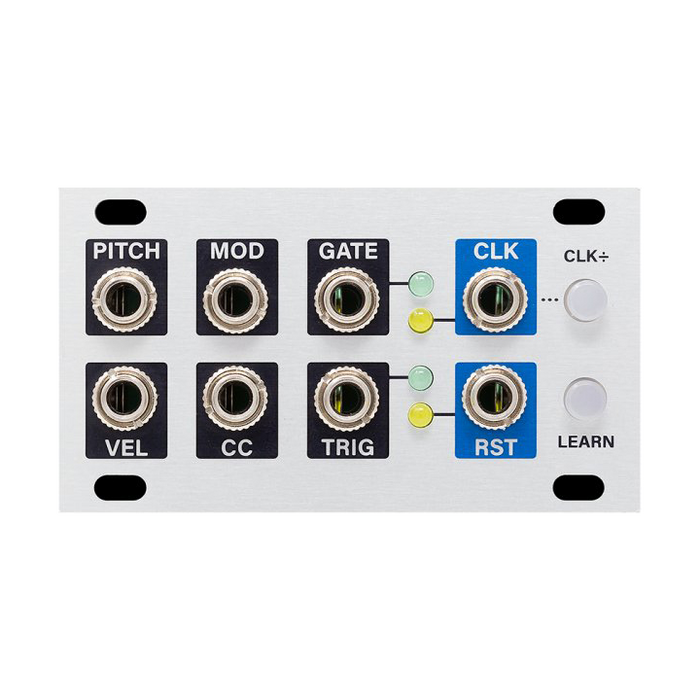
MUSICAL FEATURES
Intellijel Designs' MIDI 1U system gives you everything you need to control and sync your Eurorack modular via MIDI from your computer, mobile, or hardware device. Some of the key features of the MIDI 1U module can be quickly changed with two buttons on the front panel, and the Intellijel Config app for Mac / Win also provides complete preferences.A compact size for high connectivity, feature set, and expandability, the MIDI 2U system is an ideal solution for integrating modular and external gear.
HOW TO USE
important:The MIDI 1U module board has two different 2-pin connectors. One connects to a power source and the other to the MIDI / USB port of your case or MIDI IN Jacks 10U module.When connecting the power supply, it is recommended to connect to the connector labeled POWER referring to the image below and reconfirm before turning on the power.
Connection between this unit and Eurorack power supply, connection with MIDI IN Jacks 1U, connection with 7U Case and Palette Case,CVx expanderFor details on how to connect withmanual for more information.

There are several elements that make up Intellijel's MIDI 1U system, and their integration provides a flexible and programmable MIDI to CV conversion for Eurorack modules.The system consists of two required components and one optional component.
-
MIDI 1U Module: This unit, 14HP 1U module receives MIDI information from the connected external MIDI input connector (7U Case, Palette Case, MIDI IN Jacks 1U), and (by default) Pitch, Velocity, Mod, CC, Gate, Extracts Trigger, Clock, and Reset messages and sends proportional voltage to each 3.5mm jack.Depending on the application, the CC jack and Mod jack can be configured to respond to channel aftertouch or high resolution CC, and the Reset jack can also be configured as a Run jack.
MIDI 1U also has an alternative Dual Mode that allows you to use the remaining 6 jacks to send Pitch, Velocity, and Gate messages from two different MIDI channels, while retaining the Clock and Reset capabilities. Is possible.
-
MIDI Input Connectors: Since this unit's MIDI 1U module does not have a MIDI input jack, use the MIDI / USB input of your 7U Case or Palette Case.If you don't have a specific case, use the MIDI IN Jacks 1U module to connect an external MIDI device.
-
CVx Module: The optional component CV x 1U module adds eight more CV outputs by connecting to this unit's MIDI 1U.These additional outputs are fully programmable using the Intellijel Config app, greatly expanding the capabilities of the MIDI 8U module to control the Eurorack system.
SYNTHS extension
The Intellijel MIDI 1U system supports multiple MIDI channels with the concept of'SYNTHS'.One'Synth' here defines the device you want to control and its MIDI channel. The MIDI 1U system can control up to 1 different'Synth's on up to 10 different MIDI channels. MIDI 10U has two different MIDI channels that the user can select without a CVx expanderYou can control up to two mono synths (Synth 2 & Synth 1), but you can increase the number of available'Synth' and MIDI channels up to 2 by adding one or more CVx expanders. ..The added Synth 1 through Synth 10 can operate in monophonic, polyphonic or drum mode.
-
Monophonic: Monophonic synths are configured for the control of a single oscillator or mono synth voice.This mode is the normal operation of a typical mono-spec Eurorack device, and is also the only mode supported by the unit alone. Various related parameters such as MIDI Channel, Pitch Range, Note Priority Mode, Pitch Bend Range, Coarse Tuning, and Trigger Length can be set for each monophonic synth.
-
Polyphonic: Polyphonic synths are configured for controlling polyphonic oscillators or synth voices.This mode requires a CVx expander and is only applicable to Synth 3 through Synth 10.Polyphonic synths support up to 8 voices, and the number of outputs assigned to a particular synth determines the actual number of voices.For example, in the Intellijel Config app, one CVx is configured with 1 Pitch outputs and 4 Gate outputs, and if assigned to the same Synth, it will be a 4-voice polyphony.If you use multiple CVxs and assign 4 Pitch outputs and 8 Gate outputs to the same Synth, you get an 8-voice polyphony. Various related parameters such as MIDI Channel, Pitch Range, Voice Allocation, Pitch Bend Range, Coarse Tuning, and Trigger Length can be set for each polyphonic synth.
-
Drums: Select this option to control Drum / Percussion voices and samplers that trigger different drum sounds for each MIDI note number. This mode requires a CVx expander and is only applicable to Synth 3 through Synth 10. Drum mode supports up to 8 voices per MIDI channel. Assign the voice to a MIDI note number via the Intellijel Config app and the output will determine one of the Gate, Trigger, Velocity values.If multiple outputs are assigned to the same MIDI note, those outputs will use only a single voice.
MIDI 1U MODULE MODES
The MIDI 1U module operates in either Single or Dual mode.To switch the mode of this unit, change the Module Mode parameter of the Intellijel Config app, or press and hold the LEARN button of this unit for 2 seconds or longer.
Single Mode: This is the initial value and the most basic mode.The functionality of the module in this mode is shown on the front panel, using only a single monophonic'Synth' (Synth 1),Responds to MIDI commands for the configured (or memorized) MIDI channel.MIDI data from the setting channel is converted to CV after analysis and output from the corresponding jack.Many features can be set and remembered from the front panel, but the Intellijel Config app offers even more customization. In Single Mode, the LEARN button is off (except during Learn parameter value).

Dual Mode: In the alternative dual synthesizer mode, a single MIDI 1U module can control two independent monophonic'Synth'(Synth 1 & Synth 2).In this mode, each'Synth'can respond to an individual MIDI channel, with two completely different'Synth's.Provides MIDI control for Pitch, Gate and Velocity. When Dual Mode is selected, the Mod, CC, and Trig jacks are changed to Pitch, Velocity, and Gate outputs for Synth 2, respectively.If you have the required number of clock divisions, you need to set them before entering Dual Mode. In Dual Mode, the LEARN button is illuminated in yellow.

MIDI 1U FRONT PANEL

[1] LEARN button:Use this button to respond to MIDI 1U MIDI channels, and CC[F]And MOD[IS]Learn (set) the MIDI CC number assigned to both output jacks. MIDI 1U automatically saves all learning information (CLK ÷ button flashes green) after MIDI is inactive for 2 seconds, ensuring that it returns to the same state after power cycling.
The LEARN button cycles through the following three states with each click.
- Off: MIDI 1U converts the received MIDI data to CV as usual.
- Illuminated in blue:Indicates that MIDI 1U is in LEARN CC + CH mode and is waiting to receive MIDI messages.The first message you receive is the Synth 1 MIDI channel and CC[F]Assigned to Jack.
- Flashing blue:Indicates that MIDI 1U is in LEARN MOD + CH mode and is waiting to receive MIDI messages.The first message you receive is a Synth1 MIDI channel and mod[IS]Assigned to Jack.
[2]CLK ÷ button:This button works in two ways:
NORMAL OPERATION: During normal operation when the LEARN button is off, click this button repeatedly to set the division of the received MIDI clock as follows.
- / 1 (clock out = 24ppq)
- / 3 (clock out = 32nd notes)
- / 6 (clock out = 16th notes)
- / 12 (clock out = eighth notes)
- / 24 (clock out = quarter notes)
- / 48 (clock out = half notes)
- / 96 (clock out = whole notes)
The LED attached to the CLK output jack blinks at the set number of divisions.This setting can also be done via the Intellijel Config app.
LEARN OPERATION: When the LEARN button is lit or flashing blue, while MIDI 1U is in one of the LEARN modes, clicking this button will output the CV output of the CC and MOD jacks between unipolar (green) and bipolar (red / green). Switch.This polarity switching setting can also be performed via the Intellijel Config app.
[AND]CLK OUT:CLK ÷[2]The MIDI clock pulse of the number of divisions set by the button is output, and the accompanying LED indicates by blinking the specified number of divisions.
[B]RST OUT:Outputs a RESET or RUN signal according to the settings in the Intellijel Config app. When set as a RESET output (default), the module sends a trigger signal from this jack each time it receives a MIDI reset message, indicated by an accompanying LED. When set as a RUN output, this jack sends a RUN gate signal that maintains + 5V (gate high) while the external MIDI CLOCK is running, and stops the external MIDI CLOCK to return the gate to 0V (low). ..This is useful for starting / stopping playback while keeping the Eurorack sequencer in sync with the external MIDI sequencer.The accompanying LED is lit while the RUN gate is high.
[C]PITCH OUT:5V / oct CV output in the ± 1V range.The output voltage is determined by the note value of the MIDI channel number assigned to Synth 1 of MIDI 1U and the additional pitch bend value. MIDI Note 0 (C-2) maps to -5V and MIDI Note 120 (C8) maps to + 5V. Various pitch-related parameters such as Pitch Bend Range and Coarse Tuning can be set via the Intellijel Config app. Whether the MIDI 1U module is in Single mode or Dual mode, the output signal from this jack will be the Synth 1 pitch output.
[D]VEL OUT:Synth 1 velocity output.The output range is 0V to + 5V, which is proportional to the MIDI Velocity information received from the MIDI channel number assigned to Synth 1 of MIDI 1U.Whether the MIDI 1U module is in Single or Dual mode, the output signal from this jack will be the Synth 1 velocity output.
[IS]MOD OUT:The output signal from this jack depends on the MIDI 1U operating mode.
- Single Mode: It is a CV output for Synth 1. CLK ÷[2]Outputs 0-5V or ± 5V CV based on the learning information with the button or the polarity assignment information set with the Intellijel Config app.By default, the CV proportional to the modulation wheel information (CC # 1) sent from the MIDI controller of the MIDI channel number assigned to Synth 1 of MIDI 1U is output.This initial CC allocation is LEARN[1]It can be rewritten via the button or the Intellijel Config app.
- Dual Mode: It becomes the Pitch output for Synth 2 and outputs ± 5V 1V / oct CV.The output voltage is determined by the note value from the MIDI channel number assigned to Synth 1 of MIDI 2U and the additional pitch bend value.MIDI Note 0 (C-2) maps to -5V and MIDI Note 120 (C8) maps to + 5V.Various pitch-related parameters such as Pitch Bend Range and Coarse Tuning can be set via the Intellijel Config app.
[F]CC OUT:The output signal from this jack depends on the MIDI 1U operating mode.
- Single Mode: It is a CV output for Synth 1.CLK ÷[2]Outputs 0-5V or ± 5V CV based on the learning information with the button or the polarity assignment information set with the Intellijel Config app.By default, a CV proportional to the breath control information (CC # 1) sent from the MIDI controller of the MIDI channel number assigned to Synth 1 of MIDI 2U is output.This initial CC allocation is LEARN[1]It can be rewritten via the button or the Intellijel Config app.
-
Dual Mode: Velocity output for Synth 2.The output range is 0-5V, which is proportional to the MIDI Velocity information received from the MIDI channel number assigned to Synth 2.
[G]GATE OUT:Gate output for Synth 1. Outputs + 1V (high) while the note information received from the MIDI channel number assigned to Synth 1 of MIDI 5U is pressed.While the gate signal is high, the accompanying LED is also lit to indicate.Whether the MIDI 1U module is in Single or Dual mode, the output signal from this jack will be the Synth 1 gate output.
[N]TRIG OUT:The output signal from this jack depends on the MIDI 1U operating mode.
- Single Mode: Trigger output for Synth 1. Sends a + 1V trigger signal each time it receives a MIDI Note On message from the MIDI channel number assigned to Synth 5.The trigger signal length is initially set to 5ms, but can be rewritten via the Intellijel Config app.While the trigger output is high, the accompanying LED is lit to indicate.
- Dual Mode: This is the gate output for Synth 2.Outputs + 1V (high) while the note information received from the MIDI channel number assigned to Synth 2 of MIDI 5U is pressed.While the gate signal is high, the accompanying LED is also lit to indicate.
Configuring MIDI 1U using the front panel
In this section, you will learn how to make various settings from the front panel of this unit.
Learn a MIDI channel (Synth 1):Use the LEARN button on the front panel to set the Synth 1 MIDI channel.
- LEARN[1]ボ タ ンClick and make sure the button is in blue illumination (waiting for MIDI message reception).
- Send any channel-based MIDI message. Synth1 will automatically set its MIDI channel and the LEARN button will turn off.Also, if the incoming MIDI is stopped for 2 seconds or more, MIDI 1U will automatically save the learned settings (CLK ÷ button flashes green) and will return to the same state after power cycling.
* You can also set the CC and MOD jack assignments during LEARN of the MIDI channel according to the explanation below.
Learn the CC Jack Assignment (Synth 1):If you are using Single mode, use the LEARN button to CC[F]You can also assign a function to the jack.
- LEARN[1]If the button is off, click it once.This will change the button to blue illumination (waiting for MIDI messages), indicating that the module is in LEARN CC + CH mode.The next step is to CC Synth 1[F]Learn how to assign any MIDI channel and CC # to the jack and set the polarity of the CC jack.
- CLK ÷[2]Click the button and CC[F]Select the jack operation from unipolar (0-5V, green illumination) and bipolar (± 5V, red / green blinking).
- CC[F]Send a MIDI message using the CC # you want to assign to the jack.The module automatically CCs the sent CC #[F]Assign it to the jack and at the same time set the Synth 1 MIDI channel to match.The module also assigns the polarity of the CC jack and the LEARN button returns to off.
Example: When you operate the Expression (CC 2) knob of a MIDI controller assigned to channel 11, Synth 1 automatically assigns itself to respond to CH 2, based on the Expression (CC 11) information of the MIDI device. CC to send CV[F]Set the jack.
Learn the MOD Jack Assignment (Synth 1):If you are using Single mode, use the LEARN button to MOD[IS]You can also assign a function to the jack.
- LEARN[1]If the button is off, click it twice.This will cause the button to flash blue (waiting for MIDI messages), indicating that the module is in LEARN MOD + CH mode.The next step is the Synth 1 mod[IS]Learn how to assign any MIDI channel and CC # to a jack and set the polarity of a mod jack.
- CLK ÷[2]Click the button and MOD[IS]Select the jack operation from unipolar (0-5V, green illumination) and bipolar (± 5V, red / green blinking).
- MODE[IS]Send a MIDI message using the CC # you want to assign to the jack.The module automatically mods the sent CC #[IS]Assign it to the jack and at the same time set the Synth 1 MIDI channel to match.The module also assigns the polarity of the MOD jack and the LEARN button returns to off.
Example: If you operate the Portamento Time (CC 3) knob on a MIDI controller assigned to channel 5, Synth 1 will automatically assign itself to respond to CH 3, and the Portamento Time (CC 5) information of the MID device. MOD to send CV based on[IS]Set the jack.
Dual Mode Configuration (Synth 1 + Synth 2):MIDI 1U offers an alternative Dual Mode that reconstructs its own output to control two synths.In this mode, you can control both Synth 2 and Synth 1 from the MIDI 1U module, providing independent Pitch, Gate, and Velocity MIDI controls for two different MIDI channels (MOD, CC, and TRIG jacks, respectively). The function will be changed to PITCH, VEL, GATE output for Synth 2. Also, if there is an arbitrary number of clock divisions, it must be set before entering Dual Mode.
To Enter Dual Mode:LEARN[1]Press and hold the button for at least 2 seconds.This will rebuild the module as a dual channel device and change the functionality of each output as shown in the image above.Also, the LEARN button glows yellow to indicate that the module is in Dual Mode.
To Learn MIDI Channels:
- LEARN[1]Click the button to put the Synth1 MIDI channel in Learn standby (the button turns red).
- Sends any channel-based MIDI message. Synth1 automatically sets itself to the MIDI channel of the received message.
- Click the LEARN button again to put the Synth MIDI channel in Learn standby (the button changes to blinking red).
- Sends any channel-based MIDI message. Synth 2 automatically sets itself to the MIDI channel of the received message, and the LEARN button stops blinking.The module will return to Dual Mode and the button will also return to yellow.
To exit Dual Mode:Press and hold the LEARN button for 2 seconds or longer during operation in Dual Mode (LEARN button = yellow) to return to Single Mode.This will return the module for control on a single device (Synth 1) and will also return the output settings for the MOD, CC and TRIG jacks to the previously programmed state.