MUSICAL FEATURES
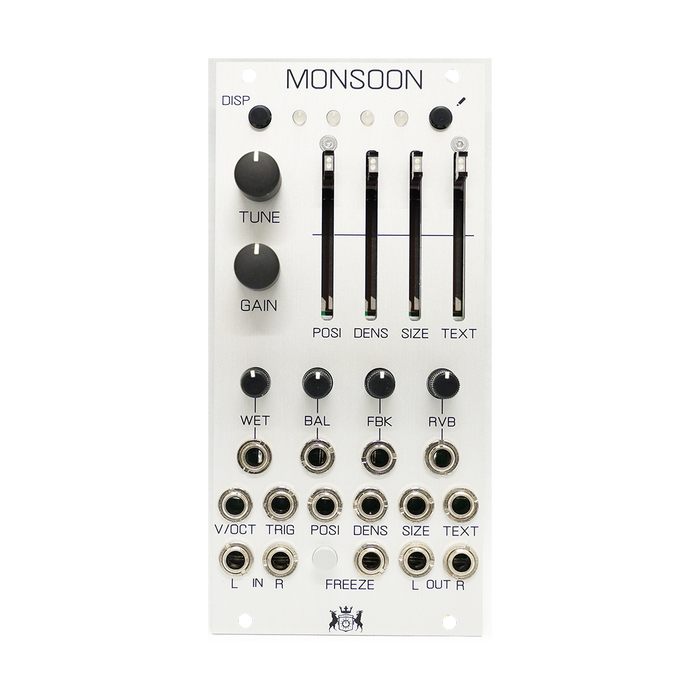
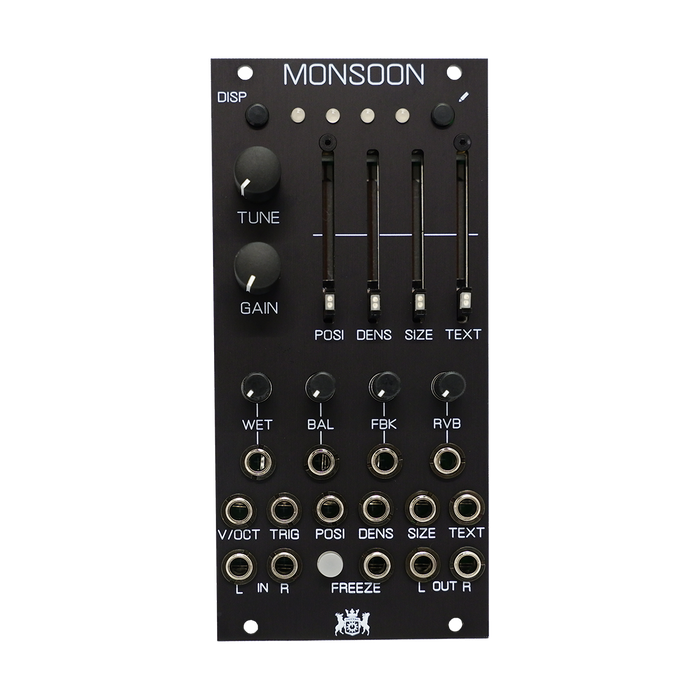
Monsoon isMutable Instruments CloudsThis is a signal processor cloned from and compacted to 12HP.Further brushed up the original firmware and added 4 more modes to 2 modesParasietesFirmware is pre-installed.In contrast to the original machine, where a single knob performed multiple functions, Monsoon allows independent control of all parameters, achieving a unique evolution in functionality and usability.
PARASITES FIRMWARE
official firmware
- granular processor
-
pitch shifter
- looping delay
- spectral madness
4 modes are installed (except Granular was released later), but Prarasites firmware further
, and the official mode also has an envelope option, finer grain generation, clock divide sync for loop delay, stereo delay (ping-pong delay) and (coarse) open feedback loop support, greatly improved sound quality. , faster delay time changes, etc.
HOW TO USE
Press the two black buttons at the same time to switch between the 6 modes. When the LED flashes orange, you can press the Blend button or the Load/Save button to go forward or backward through the modes.Toggle the audio quality by pressing and holding the pencil button button. The DISP button switches the display contents of the LED.
Below is a description of how to operate the six modes.
Granular Processor
This is the original real-time granular processor mode.Create textures and soundscapes by layering, delaying, transposing, and enveloping segments of sound taken from an audio recording buffer.Unlike other granular Eurorack modules, it focuses on real-time processing of audio sources from your modular system itself, rather than playing pre-recorded samples from storage devices.
POSThe slider determines where the grain will play in the audio buffer.SIZEThe slider determines the size of the grain, and on the right is the Pitch knob that determines the pitch of the grain.These two knobs return to the original frequency at the middle position.TEXTSet and morph envelope curves for different grains with the sliders.
DENSThe slider controls how often grains occur.No grain occurs in the middle position.Rotate to the right to generate grains at random timings, and to the left to generate evenly spaced grains.The larger the left or right turn, the greater the overlap between the note durations of the grains.
Gainis an input gain knob that varies from -18dB to 6dB.
WETis the dry/wet balance,BALis the stereo spread,FBKis the amount of feedback,RGBcontrols the amount of reverb.
FREEZEWhen you press the button, the audio buffer will continue to process several seconds of current memory data without updating.Load & SaveYou can save and load up to 4 types of frozen audio using the buttons.
Freeze & Trigger Input
A gate signal input for freezing voltage and an input jack for a trigger signal that generates a single grain. By setting DENSITY to 1 (middle) and inputting a trigger signal here to produce sound, Monsoon becomes a micro sample player.
Pitch Shifter/Time Stretcher
This mode is very similar to Granular mode, but uses two overlapping particles synchronized to the most prominent period of the sound.The grains are carefully spliced so they mate well with each other (a technique similar to the "deglitching" of early pitch shifters).with the recording frozenPOSITIONmodulating will scrub the audio buffer.
DENSITYcreates a granular diffusion effect based on an allpass filter.
TEXTUREacts as a lowpass/highpass filter.
SIZEcontrols the size of the overlapping window used for pitch shifting and time stretching.
TRIGSending a trigger to the input will create a clocked loop (if FREEZE is enabled) or a stuttering effect.
Looping Delay
Looping Delay mode plays audio from the buffer continuously without granulation.
POSITIONcontrols the distance (i.e. delay time) between the playhead and recordhead. Modulating POSITION produces an effect similar to vinyl scratching or manual manipulation of tape.
SIZEcontrols the size of the overlapping windows used for pitch shifting - a smooth result that can blur transients all the way clockwise, resulting in a grainy, almost ring-modulated sound all the way counter-clockwise.
FREEZEis enabled, the contents of the audio buffer will loop (stutter effect). POSITION controls the start of the loop and SIZE controls the duration of the loop. DENSITY creates a granular diffusion effect based on an allpass filter, while TEXTURE acts as a lowpass/highpass filter.
FREEZEWhen enabled, sending a trigger to the TRIG input will create a clock sync stuttering loop.Otherwise, the period of the trigger pulse sets the delay time - but this delay must be shorter than the size of the recording buffer.
Spectral Madness
In this mode, the input signal enters the analysis buffer and is converted to spectral data, which is stored, converted, recombined, and resynthesized from the data to form the output from the synthesis buffer.
POSITIONselects which buffer the audio is put into (if FREEZE is inactive) or from which buffer the audio is synthesized (if FREEZE is active).For example, set POSITION to the minimum value. Press FREEZE.This will give you the first texture. Set POSITION to maximum value. Press UNFREEZE.Wait for something else to happen with the input audio.Press FREEZE again. Moving POSITION will interpolate between the two textures captured when FREEZE is pressed.The quality setting places 2 to 2 buffers across the POSITION knob.What the module is doing is crossfading between "wavetables" of FFT slices.
SIZEmodifies the polynomial coefficients that determine how frequencies are mapped between the analysis and synthesis buffers.This is like a one knob GRM Warp.Over the entire knob, it not only shifts the spectrum, but also inverts it.
PITCHcontrols the transposition (pitch shift).
DENSITYdetermines how results are passed from the analyzer to the resynthesizer. Below 12 o'clock there is an increased chance that a particular FFT bin will not be updated, creating a partial freeze-like effect. After 12 o'clock, adjacent analysis frames are more intermingled.At extreme settings, random phase modulation is applied to smooth out, giving different flavors like spectral turbidity/reverb.
TEXTUREdoes two things: below 2 o'clock, the amplitude of the spectral components is more quantized, more like a very low bitrate audio file. After 12:12, the strongest partial waves are gradually weakened and the weakest are amplified.This has the effect of making the spectrum resemble noise.
TRIGSending a trigger to the input causes various glitches in the frequency domain typical of corrupted (encoded) audio files.This acts as a build-up/feedback effect - the shorter the pulse, the smaller the effect.The longer it gets, the more messy it gets.
MIVerb mode
Miverb is a full featured CV controllable modeless reverb with several features.
The new Miverb mode is accessed like any other factory playback mode: press both black buttons, press either of the two buttons until the last three are lit (i.e. only the first LED is not lit).This mode is mono input, stereo output.Reverb parameters can be controlled with knobs and CV inputs:
PositionThe knob controls the amount of time (from 0 to about half a second) before the reverb begins after the sound has entered (pre-delay).When a clock is fed into the Trig input, this knob becomes a predelay clock divider/multiplier: at the 12 o'clock position, the predelay takes on the value of the clock length; Divided and counterclockwise multiplied according to the following rates: 1/16, 3/32, 1/8, 3/16, 1/4, 3/8, 1/2, 3/4, 1 , 3/2, 2/1, 3/1, 4/1, 6/1, 8/1, 12/1 (borrowed from Echophon).Clock division is limited to a maximum division that does not exceed the maximum delay; beyond that point the Position knob has no effect.Changing pre-delay in real time is smooth and does not affect pitch (using internal timestretcher).
SizeThe knob controls the length of all delays in the reverb, i.e. the size of the simulated room.It varies from a small resonator to a huge hall.
DensityThe knob controls the amount of sound fed back into the reverb loop, or the decay time of the reverb tail. Above 3 o'clock, this signal is actually amplified and the reverb goes into self-oscillation.
Each time the sound is fed back into the reverb, it can be pitch shifted.PitchThe knob controls the amount of pitch shift from -1 to +1 octave. At 12 o'clock, no pitch shift is applied; fully clockwise you get the classic shimmer effect; you'll find plenty of oddities in between.To hear the effect of the pitch shifter, it is necessary to increase the Decay and feed back the sound. Size affects how much the sound is pitch-shifted: the larger the room size, the more accurate the pitch-shift.
TextureThe knob controls the damping of the reverb.From full CCW to 12 o'clock a low pass filter is applied to simulate room absorption. From 12 o'clock to full CW, a high-pass filter is applied for an unusual, crystal-like effect.
FreezeThe button sets the reverb to (almost) infinite decay and mutes the input.This works best with no pitch shift and large sizes.
BALcontrols how "smoothed" the sound is each time it passes through the loop.Rotate fully clockwise for a denser, more continuous sound.When turned fully counter-clockwise, you'll hear distinct repeats of the sound, much like a multi-tap delay.
Each delay in the reverb can be individually modulated by 9 smoothed random LFOs.RGBcontrols the amount of modulation the LFO applies to the delay time.Small modulations produce subtle choruses and ghost tones, large modulations produce random pitch shifts.
FBKcontrols the speed of these LFOs.It ranges from about 1/100Hz to about 100Hz.This knob has no effect if there is no modulation amount.
Resonator mode
This is a polyphonic dual-voice, 4-part resonator (or comb filter) pronounced by Karplus-Strong technique or by extension.To access it press both black buttons, then press either of the two buttons until only the second LED is off (i.e. if LEDs 2, 2 and 1 are lit).
First, put the knobs in the following positions: Size, Density, Stereo spread, Feedback, Reverb fully counterclockwise, Pitch, In gain, Position, Texture at 12 o'clock, Dry/Wet fully CW ( clockwise).
Each input feeds each of the two voices/resonators. In L is internally wired to In R, so if nothing is patched to In R, the In L signal will feed both voices.
DensityThe knob controls the decay. After the 3 o'clock position, the decay becomes infinite and the sound sustains forever (you can use this as a traditional oscillator).
The pitch of the controlled resonator isPitchControlled by a knob and V/Oct input, the resonator can be "played" like an oscillator. At 12 o'clock the pitch is A3 (220Hz).In fact, each voice consists of four "parts" (four resonators) that can be set to different pitches to form chords.SizeKnobs set chords. Gradually morphs between Unison, Fat, Superfat, Fat power, Fat octave, Octaves, Power, Major, Major7, Minor7, Minor, Sus2, Sus4, Minor9, Major9, Minor11, Major11, Major11.
TextureThe knob helps attenuate the high/low frequencies as the sound passes through the resonator. At the 12 o'clock position, no filtering is applied. CCW is a low pass filter and CW is a band pass filter.Thus, a short acoustic pulse passing through a resonator will have longer attenuation with fewer high (possibly low) frequencies.
Karplus-Strong synthesis involves sending short bursts of noise to 'excite' a resonator, allowing the synthesis of stringed instruments such as guitars.No additional modules are needed here: sending a trigger to the Trig input will switch the current voice (if Freeze is inactive) and send a short noise burst to the switched voice. The Position knob roughly models the timbre and duration of this burst, representing where the string is struck.
In Resonestor, the module switches the active voice each time a Trig is received, giving you duophony.At any given time, the knobs (pitch, chord, feedback, damping) will only control the parameters of the active voice's resonator, other voices will retain their last set parameters.If you are happy with the sound of your current voice and want to keep it running (perhaps as a drone, use other voices for the melody),FreezePressThis will switch voices immediately and prevent Trig from switching voices automatically.
Positioncontrols the timbre and duration of the noise burst. CCW is longer and more damped, CW is shorter and more treble.At both ends of the knob, the burst will be inaudible (either too damped or too short) and can be used to "mute" the voice.
Freezewill switch the current voice and prevent further voice switching by Trig CV.
WETrandomly distorts the timbre of the voice by modulating each comb filter with low-pass filtered noise.At full CCW, the amount of modulation is maximum, but the noise is completely filtered and has no effect.Perfectly CW, the noise is unfiltered and the modulation amount is zero, so there is no effect.In between, you can get interesting effects, from subtle shakes to hard distortions.
BALassigns each part and voice to an output (Out L or Out R).In full CCW each voice goes to a different output. At 12 o'clock, both voices are evenly mixed to both outputs.In full CW, parts of both voices are distributed to both outputs for a wide stereo effect.
FBKsimulates string harmonics.In full CCW, it has no effect.Completely CW will sound the second harmonic. 2 at 12 o'clock次, 10 at 4 o'clock次etc.
RVBs are Controls the random delay time before a sound (input or burst) hits each resonator in the current voice.When used in KS synthesis with chords, it gives the impression that the strings are slapped.The delay time is randomized on each voice switch.