MUSICAL FEATURES
SCLPL is a stereo 5-band digital EQ / morphing filter module. The dual mono / stereo configuration SCLPL is not only useful as a stand-alone, but also of the company's WMD.Performance mixerIt provides excellent enhancements for any setup with.
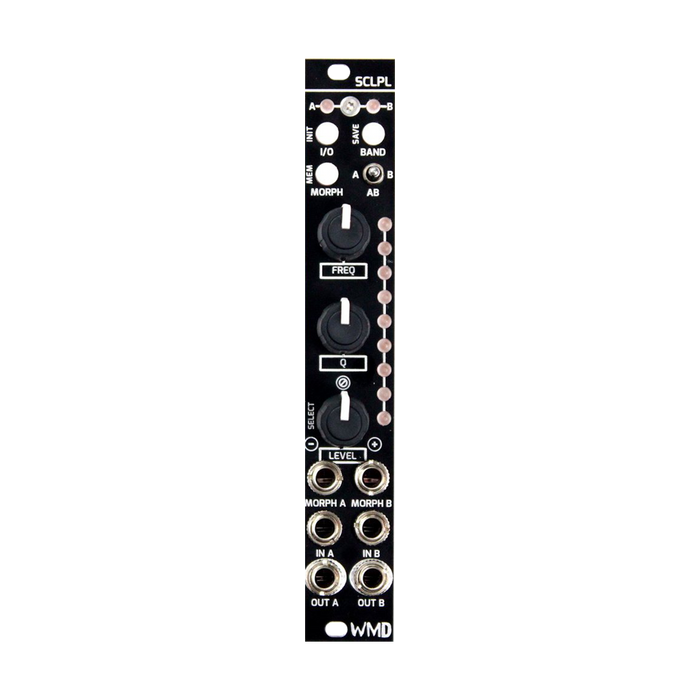
To edit a frequency band consisting of 3 bands of Low Shelf, 5 Mid-Range Peaking Band, and High ShelfBANDSelect a band with the button,LEVEL, Q, FREQUENCYUse the knobs to adjust the parameters individually. The state of the band during editing is in real timeSPECTRUM Since it is displayed on the LED, the status of each filter can be checked.Always checkingYou can adjust it. The 9 LEDs on SPECTRUM are also used to navigate preset storage slots, as shown in 1, 2, 3 .. from the top.
The created presets can be saved in 9 preset slots (18 for dual mono).MORPH PRESETHold down the buttonLEVELSelect the save destination slot with the knob,I / OButton orBANDPress the button to confirm. Also,MORPH PRESETWith a single tap of the button, modules can switch between presetsCVor sending us a message onLEVELSwitch to Morph mode for smooth morphing with the knob. This timeSPECTRUM The LEDs show that you are morphing between slots.
- 5-band EQ / morphing filter
- Simple and easy to program interface
- "Trim" level adjustment for each preset
- LED that visually feeds back the state of each filter
- Each 3 bands in the midrange supports a wide range of cuts to resonant peaks
- Low and high frequency shelving
- 9 programmable presets (18 for dual mono)
- Digital audio signal path with low noise design
- Providing a unique filter sound with the Morphing function
- Flexible function with monaural / dual mono / stereo configuration
- Equipped with a bypass switch that is convenient for dry / wet comparison
How to Use
SCLPL input mode
stereoWith input mode
Dual monoThere is an input mode. Set the IO switch to the middle position to enter stereo mode.In this mode, it is assumed that inputs A and B are stereo pairs, and all parameter operations and preset selections are reflected in both A and B.When the switch is set to the left or right, in dual mono mode, the current knob and preset settings are reflected only on the channel selected by the switch.
In addition, the operation mode of SCLPL is always selected from Edit mode, Preset mode, and Morph mode. You can switch between Edit mode and Morph mode by pressing the Morph button. In Preset mode, hold down the Moprh button.
-
Edit mode: This mode is for editing the EQ settings of the selected preset. Use the Band button to select the band to edit from 5 bands, and use the knobs to set the Freq, Q, and Level parameters.
-
Preset mode: Select and save presets. Hold down the Morph button, turn the Level knob, and release the button to recall the preset. Hold down the Morph button and select a preset, then press the Band button to save the current settings to the selected preset.In dual mono mode, preset banks A and B are prepared separately.
-
Morph mode: Press and release the Morph button from Edit mode to switch to Morph mode, and use the Level knob to morph between presets.The operation of the morphing CV is to morph the presets of both channels with either Morph A or B CV in stereo IO mode.In mono IO mode, the Morph CV control for each channel is independent.
Interface
The explanation of each part is displayed by mouse over