MUSICAL FEATURES
UniFX is a compact and flexible effects interface that provides interconnections such as using either a Eurorack synthesizer or an external device as an effects processor. UniFX readjusts the level of the audio signal, provides voltage control for the dry/wet mix, and even switches the source of the main and effect signals.
HOW TO USE
Effects loop settings
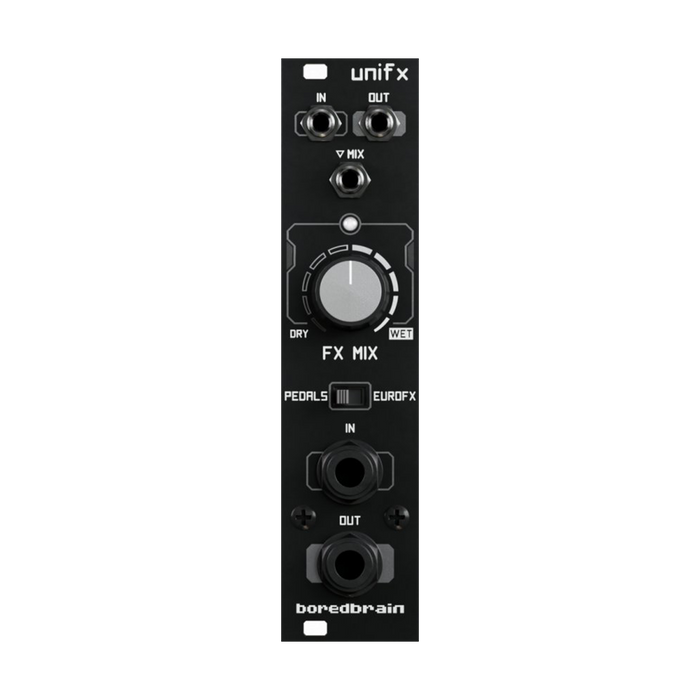
UniFX makes it easy to process Eurorack audio signals with pedals, or vice versa with Euroracks.Two sets of mono input and output jacks on the front panel'IN'と'OUT'are respectively 3.5mm for eurorack levels and 1/4 inch for pedal levels.in the middle of the moduleswitch settingsBy changing the , you can switch which input/output pair is the main signal and which is the FX Send/Return.
- To process the Eurorack audio signal with a guitar pedal or outboard gear, flip the switch to 'PEDALS' position.Patch your Eurorack source signal to the 3.5mm input/output pairs and connect any pedal effects etc. to the 1/4" input/output jacks.
- To process a line-level device or a guitar through the Eurorack module, turn the switch to 'EURO FX' position.Connect line source signals to the 1/4" inputs and outputs, and patch modules such as filters and effects to the 3.5mm inputs and outputs.
Audio level scaling is approximately ±12dB, allowing a wide range of pedals.
mix control
FX MIXA parameter is a variable crossfader that controls the dry/wet balance of the input and FX return signals, and the effect mix amount is indicated by a white LED above the knob.When the knob is set to the minimum value, only the input signal is output and the LED is off.Conversely, when the knob is set to maximum, only the effect return signal is output and the LED is fully lit.A 50/50 mix balance is achieved with the knob set in the middle.
This parameter is 'MIXIt can also be automated using the CV input labeled ', in which case the knob position is used as a bias control for the incoming signal.The maximum range of the parameter is 10Vpp, so if you use a ±5V common LFO, you can sweep the FX MIX fully up and down by setting the knob position to center.
VCA and feedback effect
Since the circuit of this unit is based on VCA with DC coupling, it can also be used as a general VCA for audio or control voltage.The only difference is that the control input acts in the opposite direction, increasing the voltage will decrease the signal level.To do so, simply patch your main signal to the 3.5mm input/output jacks, leave nothing on the 1/4" jacks, and set the switch to the 'PEDALS' position. Raise the FX MIX control to maximum, set it so that no dry signal is output, and patch the negative going control voltage to the MIX CV input.
Also, UniFX's switching effects loop structure makes it easy to create feedback effects.Switch to "Incorrectmode and lower the value of the FX MIX control to increase the amount of FX return sent back to the FX send. A MIX CV input is available for experimental VC feedback effects.
Feedback modulation patch example
Connect your signal to the 3.5mm input and output, your guitar pedal to the 1/4" input and output, and set the switch to 'EUROFX' mode. Patch a non-polar control voltage to the MIX CV input, and adjust the bias at the knob position to control the amount of effect feedback.This patch is especially interesting with the use of reverb effects.