MUSICAL FEATURES
XNUMX variable waveform operator banks for linear FM
Humble Audio Quad OperatorWith 4 operators (oscillators) and a flexible and powerful modulation matrix, the classical FM structure like DX presets, as well as continuously evolving textures, experimental feedback patches, and LFO mode complex This is a quad operator bank that can also be used as a modulator. There is no concept of a modulated carrier, it consists of only four operators who can freely apply cross modulation.
- Implemented from scratch, including firmware, Quad Operator offers a modern approach to FM synthesis
- One function per knob for ease of use
- Any FM algorithm is possible via the modulation matrix
-
Algo Expander ModuleSave / recall algorithm (sold separately) and provide crossfade function
- Independent signal output for each operator
- Level control by VCA installed for each operator
- External audio rate FM input (with adjustable amount of modulation send to each operator individually)AR FMInput). It is possible to feed back the signal from the internal operator as well as the external audio rate signal.
- Each operator can also unlock and tune and patch individually. The module can also be a multifunctional oscillator bank.
- High-quality digital emulation of classical analog waveforms
- Equipped with LFO mode. Generate complex, phase-locked modulation signals
- Firmware update by user is possible
How to Use
Locked and free
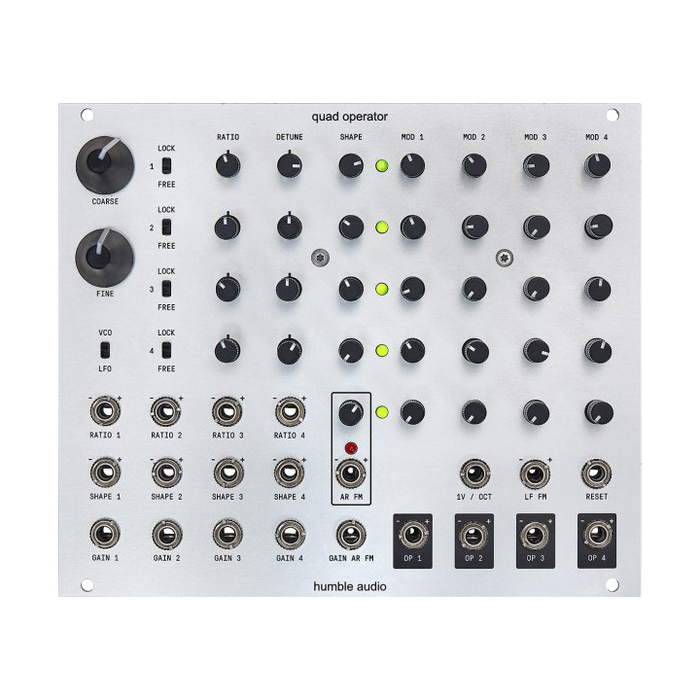
Each operator can switch between Lock and Free states with a switch. Locked operatorsCoarseとFinishThe frequency is controlled within a range that is a perfect integer frequency ratio for both parameters. This is very important for producing waveforms with harmonic overtones, which is suitable for classical FM sounds.DetuneControls introduce delicate or extremely anharmonic effects that deviate from this integral ratio relationship.
In the free state, each operator basically functions as an independent oscillator. In this case, for each operatorRatioEach knobCoarseA tuning knob (continuously variable type),Ratio CVIs for each operator1V / Oct controlWill be. You can use up to 4 independent oscillators if the modulation is all zero. In this situation, the modulation still applies, but FM without frequency / phase lock tends to be inconsistent.
External modulation function
Quad Operator can input an external signal as a modulatorAR FMInputAudio inputI have implemented a circuit. Above the input jack is an LED to indicate clipping and a gain adjustment knob. The signal size of the AR FM input can also be controlled by voltage by the gain CV input for AR FM below it. The signal to the AR FM is first adjusted by the master's gain, and then the amount of modulation send to each operator is controlled by the four knobs at the bottom of the modulation matrix.
Algo Expander
Sold separatelySomethingexpanderWith all operatorsAR FMInput eachMod xAdds the ability to save all knob positions (modulation matrix parameter values) and crossfades. Conceptually, each slot can be thought of as a classical FM synthesizer algorithm. It has three slots, A, B, and C, and a Live slot, which means the knob position of the current modulation matrix.
Starting point of the patch
It can be confusing the first time you play the Quad Operator, as playing around with a lot of parameters can easily lead to a noisy and harmonious sound. As a starting point, set the parameters with reference to the following to avoid chaotic results. By moving knobs and patches with this setting as the starting point, you can gradually approach dissonance and noise.
- VCO / LFO switchVCOTo set.
- All operatorsOn the rocksTo do.
- allDetuneKnob12Set at the hour position. -ThisRatioIt guarantees an integer frequency relationship determined only by the knob.
- allShapeKnobCounterclockwiseSqueeze. -Start with a sine wave, like traditional FM. We recommend starting without modulation, as combining waveforms with harmonics and modulation can quickly cause aliasing and noise.
- allModulation sendTheCounterclockwiseSqueeze. -Multiple mods and cross / self mods can also cause aliasing and noise.
Interface
The explanation of each part is displayed by mouse over
Calibration
V / OctとRatioIt is important to calibrate so that a 1 volt change in the input (free state) can be accurately interpreted. If you feel that your Quad Operator is not following the pitch correctly on these inputs, follow the steps below to perform the calibration.
The Quad Operator has a precision DAC output, allowing each operator to output an accurate voltage output signal. This allows calibration without the need for an accurate external reference voltage.
First, patch the module as follows
- OP1 → RATIO 1
- OP2 → RATIO 2
- OP3 → RATIO 3
- OP4 → RATIO 4 & 1V / OCT(Such as Stackable cableNon-buffardDistributed by)
Not OP1 to 3, but definitelyOP4Distribute the output. The calibration process makes some additional corrections to this distribution. Buffed distribution can introduce a small amount of gain that modifies the output voltage. Non-buffed distribution is important as it will adversely affect the measurements made during calibration.
Once you have successfully patched the module as described above, trigger the calibration procedure according to the "Cheat Code" below.
- operator1 OfFree / LockFlip the switch once
- operator2 OfFree / LockFlip the switch once
- operator3 OfFree / LockFlip the switch once
- operator4 OfFree / LockFlip the switch once
-
VCO / LFOQuickly flip the switch 5 times
When the calibration procedure is triggered, the gain LED will flash twice and then return to normal operation a few seconds later.