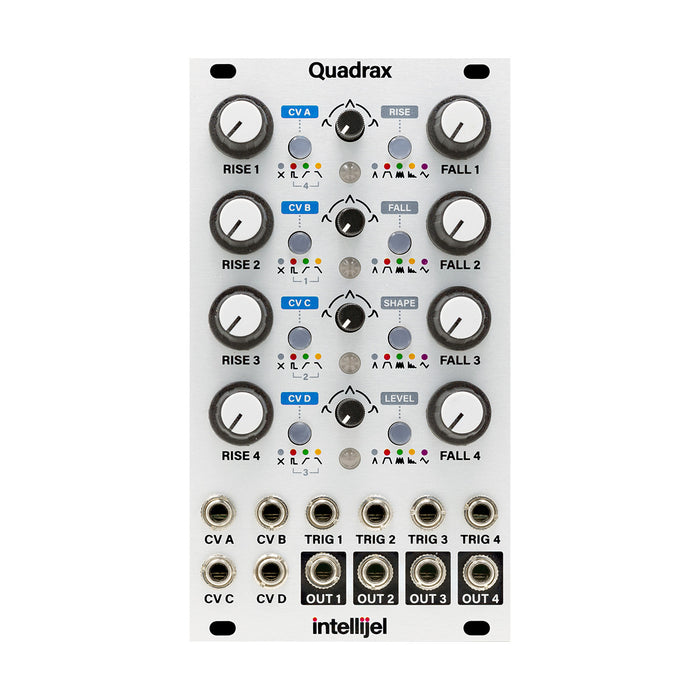
Quadrax is a 4-channel independent CV generator. With only 14 HP, four independently controllable CV generators are installed and can be combined individually or using patching or internal wiring to create more complex CVs.
Each channel performs one of the following functions.
AD (Attack / Decay) envelope. Level can be switched from 5V and 10V
AHR (Attack / Hold / Release) envelope. Level can be switched from 5V and 10V
Cycled envelope(LFO that moves in the positive range). Level can be switched from 5V and 10V
Burst generator. You can control the burst time, the number of bursts, the shape of the burst, and the amount of change in the pulse size during the burst. Level can be switched from 5V and 10V
LFOs: Morphable and syncable
randomChanging the destination to Vacillating voltage source (ver1.1 or later)
Major features:
The response curve can be adjusted for each channel, and the way the curve bends can be adjusted continuously. In addition, each stage0.3 milliseconds to 20 secondsWith a wide time range.
Between channelslinksIt is also possible, and can be triggered by the trigger input of the previous channel or EOR, EOF. It's also useful for triggering multiple envelopes with a single trigger or creating a quadrature LFO.
4 CV inputsIs the modulation destination regardless of the channelYou can freely assign multiple items.The amount of attenuation can be set in stages inside the main unit.
Settings are remembered even when the power is turned off
DEMOS
HOW TO USE
Operation in each mode
The operating mode of each channel of the Quadrax can be switched by repeatedly pressing the button on the right side of that channel. The function of each part depends on the mode. Firmware 1.1 for each modeAlternate modeWas added. To switch, press MODE / DESTINATION button for 1 second or longer.
AD (Attack / Decay) envelope mode
When the mode button is not lit, that channel acts as a classic attack / decay envelope. Each knob controls the following parameters.
Rise: Attack time
Fall: Decay time
Response: Curve shape
When receiving a trigger input, the envelope will always perform one cycle to the end.Alternate mode changes the curve shape (both Rise / Fall bulge upward or both bulge downward)
AHR (Attack / Hold / Release) envelope mode
Attack / Hold / Release envelope mode is indicated when the Mode button is lit red. Each knob controls the following parameters.
Rise: Attack time
Fall: Decay time
Response: Curve shape
The signal is held (100% sustain) while the gate signal is high, and goes to the release stage when it is low. If you are still on the RISE stage when the gate goes low, do not sustain and start the release at that level. The small response knob in the middle sets how the envelope bends.Alternate mode changes the curve shape (both Rise / Fall bulge upward or both bulge downward)
Cycle mode
When the Mode button is lit green, it's in Cycle mode and the channel behaves like a looping AD envelope, an LFO moving in the positive-only range. Each knob controls the following parameters.
Rise: Attack time
Fall: Decay time
Response: Curve shape
The waveform control is similar to the AD envelope. The trigger input can be used to reset the waveform.Alternate mode changes the curve shape (both Rise / Fall bulge upward or both bulge downward)
Burst mode
When the Mode button is lit yellow, it is in burst mode and you can cycle the envelope by specifying the number of times. Each knob controls the following parameters.
Rise: Burst rate (ver1.0: length of burst)
Fall: Burst length (ver1.0: Number of bursts)
Response: Burst nuances.Alternate mode has a different burst envelope shape
LFO mode
When the Mode button is lit in pink (magenta), the LFO mode is output and the LFO that moves ± is output. The LFO can be synchronized with the clock input to the trigger. Each knob controls the following parameters.
Rise: LFO speed (syncs x64 to 1/64 when patching clock to TRIG)
Fall: LFO waveform deformation
Response: LFO waveform transformation
Waveform can change continuously and changes as follows
LFO Alternate mode
The LFO's Alternate mode isPowerful to change destination randomly at every clockRandom CVGenerator (vacillating voltage source).
Each knob controls the following parameters.
Rise: Destination change rate
Fall: Random amplitude
Response: Amount of slew limiter randomly applied
Link between channels
Quadrax can use the previous channel to trigger the next channel (link function). Use the small button on the left of each channel to switch the link method.
No Link: No Link: Trigger envelopes and LFOs on your channel's Trig input without channel-to-channel linking
Trigger Link: It is internally connected so that the envelope or LFO is triggered by the trigger to the trigger input of the immediately preceding channel (CH1 for CH4). Triggering on your own channel is also valid.
End of Rise Link: It is internally connected so that the envelope and LFO are triggered at the end of rise of the immediately preceding channel (CH1 for CH4), that is, the moment the attack ends. Triggering on your own channel is also valid.
End of Fall Link: It is internally connected so that the envelope or LFO will be triggered at the end of the previous channel (CH1 for CH4), that is, the moment the decay ends. Triggering on your own channel is also valid.
CV assignment
CV assignments in Quadrax are extremely flexible and powerful. Each CV input from A to D can be assigned to modulate one or more envelope parameters from CH1 to CH4 with different amounts of attenuation. Assign settings and displays are done with buttons, and normal knob control can be done as it is, so operability is not compromised.
To enter the assign mode, press and hold the left Link button of the channel to which you want to assign the CV control for 1 second or longer. The button of the selected channel will flash magenta. To leave the assign mode, press and hold this button again for 1 second or longer. If you want to set another channel, press and hold the button for that channel. Press one of the four Link buttons on the left to select the CV input for which you want to make assignments (blue). The buttons on the right indicate which parameters are modulated, and correspond to Rise, Fall, Shape (response) and Level (magnitude) assignments from the top.
CV assign mode. Here, we've set the CH1 Rise and Fall to be modulated by CVC. However, Rise is modulated in the positive direction (green), and Fall is modulated in the negative direction (red). The brightness of the button shows the strength of the modulation, and you can adjust this strength in four steps by repeatedly pressing the button. It is also possible to reverse the effect of CV by pressing and holding the mode button (Attenuverter).
In assign mode, you can clear all CV assignments at the same time. To clear all CV assignments for a channel's parameters, press and hold the Channel's Link and Mode buttons simultaneously. To clear all channel assignments, press and hold the CH1 Link button and CH4 Mode button at the same time.
System Mode
System mode is a special boot mode for changing global settings, which can be entered by turning on the power while holding down the CH4 MODE / DESTINATION button. The following settings are possible in System mode
Press the CVA button to set the envelope level. The color is blue 10V (default), green 5V(From firmware version 1.3, this setting can be done in UTILITY MODE described later, so please refer to it.)
Press the RISE button to switch the Burst mode retrigger ON / OFF. Blue is OFF (default), green is ON.
Press the flashing red LEVEL button to exit System mode
UTILITY Mode
In the UTILITY Mode added from firmware version 1.3, it is possible to set the envelope level and manual trigger for each Quadrax channel. You can enter UTILITY mode by pressing and holding the RISE button and LEVEL button at the same time while the Quadrax is powered on. The following settings are possible in UTILITY Mode
The left row of buttons are manual trigger buttons for each channel.
The right column of buttons allows you to set the envelope level for each channel. If it is lit blue, the maximum level is 10V, and if you press the button for a short time, you can adjust the maximum level in order of 10V > 8V > 6V > 4V > 2V.
If it is lit orangeWhen the maximum level is 5V and you press the button for a short time, you can adjust the maximum level in order of 5V > 4V > 3V > 2V > 1V. Blue and orange lights are switched by pressing and holding the button. Channels that are in LFO mode before entering UTILITY Mode can only be set in orange.
Press and hold the RISE button and LEVEL button at the same timeExit UTILITY Mode.
firmware Update
Follow the steps below to update the firmware.
Power down the module
Connect the USB cable from the back of the module to your computer.
IntellijelPagesOpen the updater downloaded from and select the module and version from the dropdowns.
While holding the CVA button on the top left and the RISE button on the top right, power cycle the module.
At the bottom of the updaterUpdateWhen the button is pressed, the progress bar starts, and when the message “Update completed successfully” is displayed at the end, the update is complete.
Restart the modular and it should work with the new firmware